 ZARF
ZARFUygulamayı İndir Dosyaların mühürlü ve güvende
Güvenli dosya aktarımı, dosya yönetimi ve yedekleme.
Zarf; dosyalarını telefonunda klasörlerde düzenlemeni, cihazlar arasında doğrudan göndermeni, özel dosyalarını Gizli alanda şifreli saklamanı ve dilersen kendi Google Drive'ına yedeklemeni sağlar.
- Doğrudan aktarım (P2P)
- Gizli alan
- Klasörler
- Android ve iOS
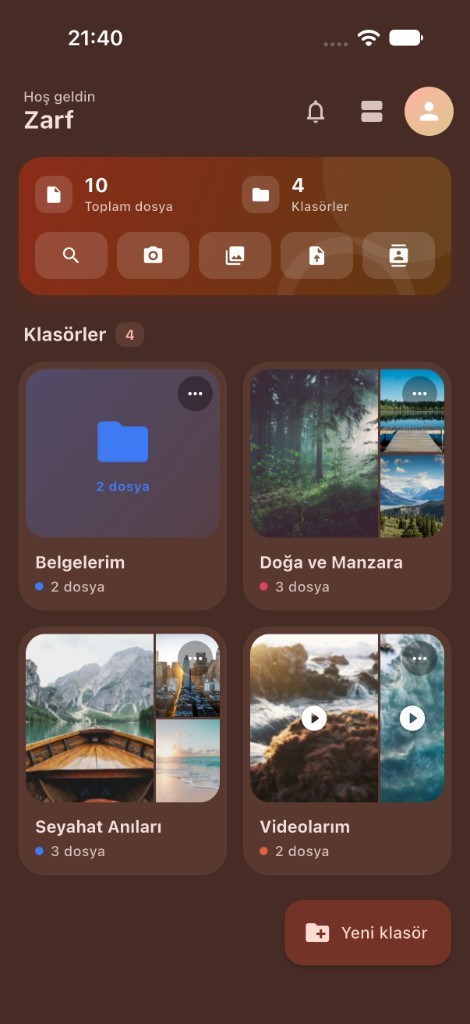
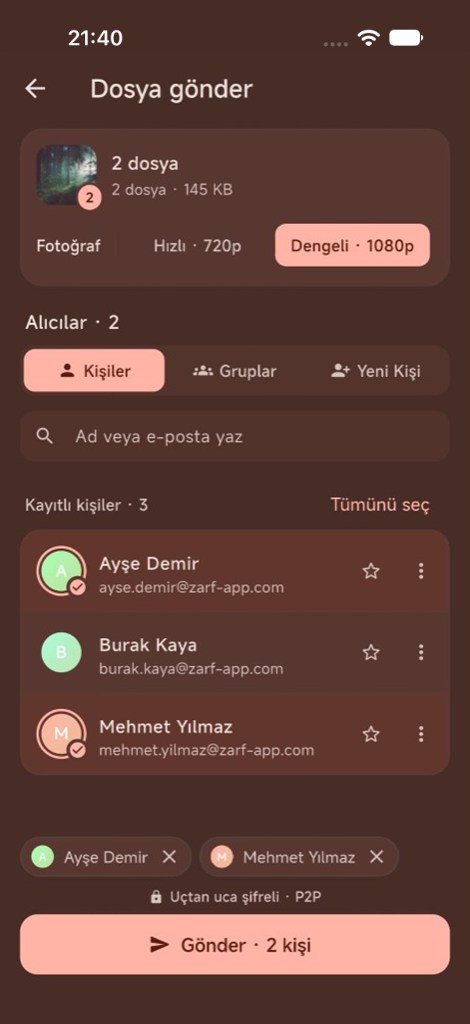
Dosya doğrudan karşı tarafın telefonuna gider
Arada sunucu olmadan (P2P), uçtan uca şifreli. Onaysız hiçbir şey gelmez: alıcıya bir istek gider, alıcı Kabul veya Reddet seçer.
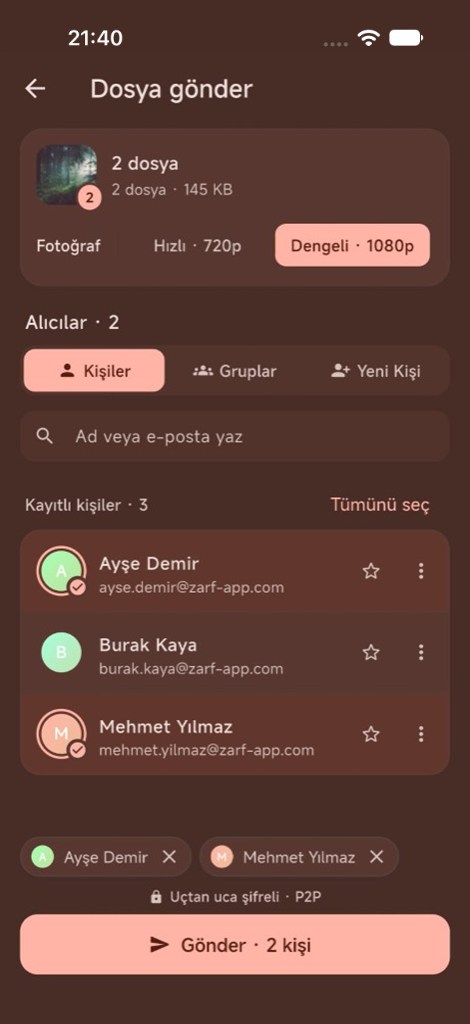

Zarf açılış ekranı → Zarf ana ekranı
Zarf'ın Öne Çıkan Özellikleri
Android ve iOS için güvenli dosya aktarımı, dosya yönetimi ve yedekleme.
Doğrudan dosya aktarımı
Dosya, arada sunucu olmadan doğrudan karşı tarafın telefonuna gider (P2P); aktarım uçtan uca şifrelidir.
Fotoğraf ve video
Uygulama içi kamerayla fotoğraf ve videoyu doğrudan klasörüne çekebilirsin.
Gizli alan
Özel dosyaların telefonunda AES-256-GCM ile şifrelenmiş olarak saklanır.
Klasörlerle düzenle
Dosyalarını telefonunda klasörlerde düzenle; galeriden veya dosyalardan ekle.
Kalite seçimi
Göndermeden önce kaliteyi seç: fotoğraflar 4K'ya, videolar 1080p'ye kadar gönderilebilir.
Google Drive yedeği
İstersen fotoğraf ve videolarını kendi Google Drive'ına yedekleyebilirsin.
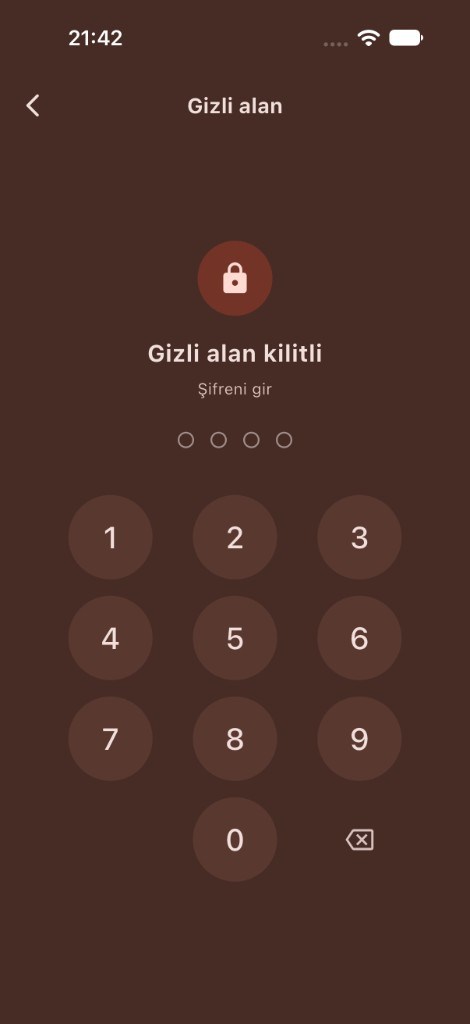
Sana özel alan, PIN ile açılır.
Gizli alan, telefonundaki gizli alanındır. Buraya koyduğun dosyalar telefonunda AES-256-GCM ile şifrelenmiş olarak saklanır.
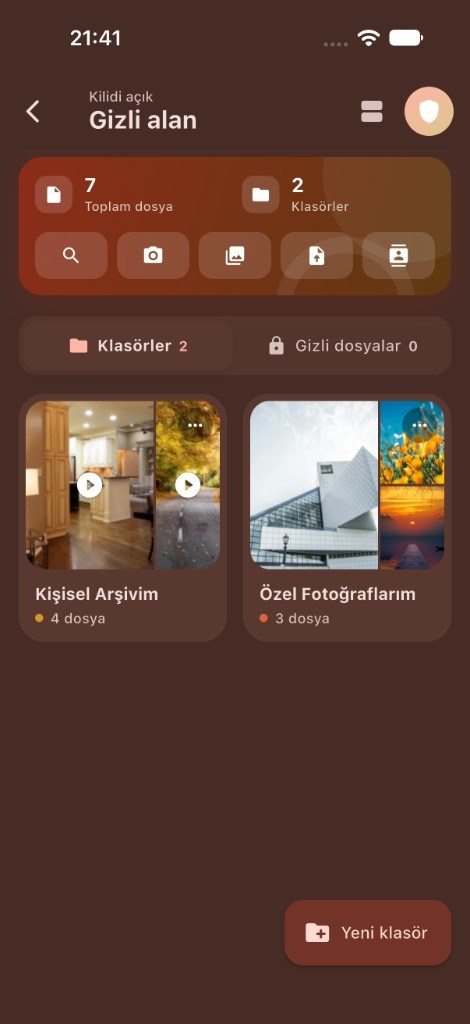
- Gizli alan yalnızca senin belirlediğin PIN ile açılır
- Şifreleme anahtarı cihazın güvenli anahtar deposunda tutulur
- Uygulama arka plana geçtiğinde Gizli alan kendiliğinden kilitlenir
- PIN'ini unutursan kurtarma anahtarınla yeni PIN oluşturabilirsin
Nasıl Çalışır?
Dosya, onayın olmadan gelmez ve arada sunucu olmadan gider.
- 1
Dosyanı seç
Zarf'ta klasörüne girip galeriden veya dosyalardan dosya ekle.
- 2
Alıcıyı belirle
Alıcıya bir istek gider; alıcı Kabul veya Reddet seçer.
- 3
Gönder
Dosya doğrudan karşı tarafın telefonuna gider (P2P), uçtan uca şifreli.
Sıkça Sorulan Sorular
Zarf hakkındaki tüm ayrıntılar.
Zarf nedir?
Zarf, dosyalarını telefonunda klasörlerde düzenlemeni ve telefondan telefona göndermeni sağlayan bir Android ve iOS uygulamasıdır. Dosyaların telefonunda saklanır; istersen fotoğraf ve videolarını kendi Google Drive'ına yedekleyebilirsin.
- Zarf'ta klasörüne girip galeriden veya dosyalardan dosya ekleyebilirsin. Android'de ayrıca herhangi bir uygulamada Paylaş'a dokunup Zarf'ı seçebilirsin; iOS'ta dosyalar galeri ya da Dosyalar uygulaması üzerinden Zarf içinden seçilir.
- Uygulama içi kamerayla fotoğraf ve videoyu doğrudan klasörüne çekebilirsin.
Cihazlar arasında doğrudan dosya aktarımı
- Dosya, arada sunucu olmadan doğrudan karşı tarafın telefonuna gider (P2P).
- Aktarım uçtan uca şifrelidir: WebRTC bağlantısının şifrelemesinin üzerine, iki telefon arasında kurulan tek kullanımlık bir anahtarla AES-256-GCM uygulanır.
- Onaysız hiçbir şey gelmez: alıcıya bir istek gider, alıcı Kabul veya Reddet seçer.
- Gönderim sürerken iki telefonda da uygulama açık ve internete bağlı olmalıdır.
- Daha önce dosya kabul ettiğin kişilerden gelen istekleri otomatik kabul edebilirsin. Android'de bu, Zarf arka plandayken veya kapalıyken de çalışır; iOS'ta ise yalnızca iOS'un arka planda izin verdiği ölçüde.
- Toplu gönderimde 720p veya 1080p seçilir.
Gizli alan: şifreli dosya saklama
Gizli alan, telefonundaki gizli alanındır. Buraya koyduğun dosyalar telefonunda AES-256-GCM ile şifrelenmiş olarak saklanır. Şifreleme anahtarı cihazın güvenli anahtar deposunda tutulur. Gizli alan hem Android'de hem iOS'ta yalnızca senin belirlediğin PIN ile açılır; çok sayıda yanlış denemede kısa süre kilitlenir. PIN'ini unutursan kurtarma anahtarınla yeni PIN oluşturabilirsin. Uygulama arka plana geçtiğinde Gizli alan kendiliğinden kilitlenir.
İsteğe bağlı Google Drive yedeği
- Yedekleme yalnızca sen açarsan çalışır ve Zarf klasörlerindeki fotoğraf ve videoları kendi Google Drive hesabına yükler.
- Dosyalar telefonundan doğrudan Drive'ına gider; sunucularımızdan geçmez.
- Her Google hesabında tek bir ana ZARF yedeği tutulur; uygulamayı yeniden yüklersen mevcut yedeğe bağlanır.
- Gizli alan dosyaları Drive'a uçtan uca şifreli gönderilir; dosya adları ve klasörler de şifrelidir. Her yedeğin kendi kurtarma anahtarı vardır ve Gizli alan yalnızca bu anahtarla açılır.
- Geri yükleme hiçbir dosyayı silmez. "Eski yedekleri koru" modunda Drive'dan hiçbir şey silinmez. "Yalnızca telefondaki dosyaları tut" modunda, telefonda artık olmayan dosyaların Drive kopyaları sana gösterilir ve yalnızca onayladıkların Drive çöp kutusuna taşınır (30 gün geri alınabilir).
Google kullanıcı verilerini nasıl kullanıyoruz?
Zarf, Google hesabına yalnızca Drive yedeğini açtığında erişim ister ve bu erişim yalnızca Zarf'ın Drive'da oluşturduğu dosyalarla sınırlıdır (drive.file). Drive'ındaki diğer dosyaları göremez. Bu erişim yalnızca yedek dosyalarını yüklemek, listelemek ve geri yüklemek için kullanılır. Drive verilerin sunucularımıza aktarılmaz, reklam için kullanılmaz ve kimseyle paylaşılmaz. Bağlantıyı istediğin zaman uygulamadan kesebilirsin.
E-posta adresi
Uygulamada dosya göndermek için e-posta adresini doğrularsın; doğrulama bağlantısını Zarf'ın yüklü olduğu telefonda açman yeterlidir. Bu sayfa herkese açıktır. Hesabını ve verilerini istediğin zaman uygulamadan silebilirsin.
ZARF
ZARFDownload the app Your files, sealed and secure
Secure file transfer, file management and backup.
Zarf lets you organize your files in folders on your phone, send them directly between devices, keep private files encrypted in the Private Space and, if you wish, back them up to your own Google Drive.
- Direct transfer (P2P)
- Private Space
- Folders
- Android and iOS
Files go directly to the other person's phone
Without a server in between (P2P), end-to-end encrypted. Nothing arrives without approval: the recipient gets a request and chooses Accept or Decline.
Zarf splash screen → Zarf home screen
Zarf highlights
Secure file transfer, file management and backup for Android and iOS.
Direct file transfer
Files go directly to the other person's phone, without a server in between (P2P); transfers are end-to-end encrypted.
Photo and video
Take photos and videos straight into a folder with the in-app camera.
Private Space
Private files are stored encrypted on your phone with AES-256-GCM.
Organize in folders
Organize your files in folders on your phone; add them from your gallery or files.
Quality options
Choose the quality before sending: photos up to 4K, videos up to 1080p.
Google Drive backup
If you wish, back up your photos and videos to your own Google Drive.
Your private area, opened with your PIN.
The Private Space (Gizli alan) is your private area on your phone. Files you put there are stored encrypted on your phone with AES-256-GCM.
- The Private Space opens only with a PIN you set
- The encryption key is kept in the device's secure key storage
- The Private Space locks automatically when the app goes to the background
- Forgot your PIN? Create a new one with your recovery key
How it works
Nothing arrives without approval, and files travel without a server in between.
- 1
Pick your file
Add files from your gallery or files from inside a folder in Zarf.
- 2
Choose the recipient
The recipient gets a request and chooses Accept or Decline.
- 3
Send
The file goes directly to the other person's phone (P2P), end-to-end encrypted.
Frequently asked questions
All the details about Zarf.
What is Zarf?
Zarf is an Android and iOS app for organizing your files in folders on your phone and sending them from phone to phone. Your files are stored on your phone; if you wish, you can back up your photos and videos to your own Google Drive.
- Add files from your gallery or files from inside a folder in Zarf. On Android you can also tap Share in any app and choose Zarf; on iOS, files are picked inside Zarf from your photo library or the Files app.
- Take photos and videos straight into a folder with the in-app camera.
Direct file transfer between devices
- Files go directly to the other person's phone, without a server in between (P2P).
- Transfers are end-to-end encrypted: on top of the WebRTC connection's encryption, AES-256-GCM is applied with a one-time key agreed between the two phones.
- Nothing arrives without approval: the recipient gets a request and chooses Accept or Decline.
- While sending, the app must be open and online on both phones.
- You can auto-accept requests from people you have accepted files from before. On Android this also works while Zarf is in the background or closed; on iOS only as far as iOS allows in the background.
- For batch sends, you choose 720p or 1080p.
Private Space: encrypted file storage
The Private Space (Gizli alan) is your private area on your phone. Files you put there are stored encrypted on your phone with AES-256-GCM. The encryption key is kept in the device's secure key storage. On both Android and iOS the Private Space opens only with a PIN you set; after too many wrong attempts it locks for a short while. If you forget your PIN, you can create a new one with your recovery key. The Private Space locks automatically when the app goes to the background.
Optional Google Drive backup
- Backup only runs if you turn it on, and uploads the photos and videos in your Zarf folders to your own Google Drive account.
- Files go directly from your phone to your Drive; they do not pass through our servers.
- Each Google account has one main ZARF backup; reinstalling the app reconnects to the existing backup.
- Private Space files are sent to Drive end-to-end encrypted; file names and folders are encrypted too. Each backup has its own recovery key, and the Private Space opens only with that key.
- Restoring never deletes files. In "Keep old backups" mode nothing is removed from Drive. In "Keep only phone files" mode you are shown the Drive copies of files no longer on your phone, and only the ones you confirm are moved to Drive trash (recoverable for 30 days).
How we use Google user data
Zarf asks for access to your Google account only when you turn on Drive backup, and that access is limited to the files Zarf creates on Drive (drive.file). It cannot see your other Drive files. The access is used only to upload, list and restore your backup files. Your Drive data is not transferred to our servers, not used for advertising and not shared with anyone. You can disconnect at any time in the app.
Email address
To send files in the app, you verify your email address; just open the verification link on the phone where Zarf is installed. This page is public. You can delete your account and data in the app at any time.
ZARF
ZARFApp herunterladen Deine Dateien, versiegelt und sicher
Sichere Dateiübertragung, Dateiverwaltung und Sicherung.
Mit Zarf organisierst du deine Dateien in Ordnern auf deinem Telefon, sendest sie direkt zwischen Geräten, bewahrst private Dateien verschlüsselt im Privaten Tresor auf und sicherst sie auf Wunsch in deinem eigenen Google Drive.
- Direktübertragung (P2P)
- Privater Tresor
- Ordner
- Android und iOS
Dateien gehen direkt auf das Telefon der anderen Person
Ohne Server dazwischen (P2P), Ende-zu-Ende-verschlüsselt. Nichts kommt ohne Zustimmung an: Der Empfänger erhält eine Anfrage und wählt Annehmen oder Ablehnen.
Zarf-Startbildschirm → Zarf-Hauptbildschirm
Zarf im Überblick
Sichere Dateiübertragung, Dateiverwaltung und Sicherung für Android und iOS.
Direkte Dateiübertragung
Dateien gehen direkt auf das Telefon der anderen Person, ohne Server dazwischen (P2P); Übertragungen sind Ende-zu-Ende-verschlüsselt.
Foto und Video
Nimm Fotos und Videos mit der In-App-Kamera direkt in einen Ordner auf.
Privater Tresor
Private Dateien werden auf deinem Telefon mit AES-256-GCM verschlüsselt gespeichert.
In Ordnern organisieren
Organisiere deine Dateien in Ordnern auf deinem Telefon; füge sie aus der Galerie oder aus Dateien hinzu.
Qualitätsoptionen
Wähle vor dem Senden die Qualität: Fotos bis 4K, Videos bis 1080p.
Google-Drive-Sicherung
Sichere deine Fotos und Videos auf Wunsch in deinem eigenen Google Drive.
Dein privater Bereich, geöffnet mit deiner PIN.
Der Private Tresor (Gizli alan) ist dein privater Bereich auf deinem Telefon. Dateien, die du dort ablegst, werden auf deinem Telefon mit AES-256-GCM verschlüsselt gespeichert.
- Der Private Tresor öffnet sich nur mit einer von dir festgelegten PIN
- Der Verschlüsselungsschlüssel wird im sicheren Schlüsselspeicher des Geräts aufbewahrt
- Der Private Tresor sperrt sich automatisch, wenn die App in den Hintergrund wechselt
- PIN vergessen? Lege mit deinem Wiederherstellungsschlüssel eine neue fest
So funktioniert's
Nichts kommt ohne Zustimmung an, und Dateien reisen ohne Server dazwischen.
- 1
Datei auswählen
Füge in Zarf in einem Ordner Dateien aus deiner Galerie oder aus Dateien hinzu.
- 2
Empfänger wählen
Der Empfänger erhält eine Anfrage und wählt Annehmen oder Ablehnen.
- 3
Senden
Die Datei geht direkt auf das Telefon der anderen Person (P2P), Ende-zu-Ende-verschlüsselt.
Häufig gestellte Fragen
Alle Details zu Zarf.
Was ist Zarf?
Zarf ist eine Android- und iOS-App, mit der du deine Dateien in Ordnern auf deinem Telefon organisierst und von Telefon zu Telefon sendest. Deine Dateien werden auf deinem Telefon gespeichert; auf Wunsch kannst du deine Fotos und Videos in deinem eigenen Google Drive sichern.
- Füge in Zarf in einem Ordner Dateien aus deiner Galerie oder aus Dateien hinzu. Unter Android kannst du außerdem in jeder App auf Teilen tippen und Zarf wählen; unter iOS werden Dateien in Zarf aus deiner Fotomediathek oder der Dateien-App ausgewählt.
- Nimm Fotos und Videos mit der In-App-Kamera direkt in einen Ordner auf.
Direkte Dateiübertragung zwischen Geräten
- Dateien gehen direkt auf das Telefon der anderen Person, ohne Server dazwischen (P2P).
- Übertragungen sind Ende-zu-Ende-verschlüsselt: Zusätzlich zur Verschlüsselung der WebRTC-Verbindung wird AES-256-GCM mit einem einmaligen Schlüssel angewendet, den die beiden Telefone miteinander vereinbaren.
- Nichts kommt ohne Zustimmung an: Der Empfänger erhält eine Anfrage und wählt Annehmen oder Ablehnen.
- Während des Sendens muss die App auf beiden Telefonen geöffnet und online sein.
- Du kannst Anfragen von Personen, von denen du schon einmal Dateien angenommen hast, automatisch annehmen. Unter Android funktioniert das auch, wenn Zarf im Hintergrund läuft oder geschlossen ist; unter iOS nur soweit iOS es im Hintergrund erlaubt.
- Beim Sammelversand wählst du 720p oder 1080p.
Privater Tresor: verschlüsselte Dateiaufbewahrung
Der Private Tresor (Gizli alan) ist dein privater Bereich auf deinem Telefon. Dateien, die du dort ablegst, werden auf deinem Telefon mit AES-256-GCM verschlüsselt gespeichert. Der Verschlüsselungsschlüssel wird im sicheren Schlüsselspeicher des Geräts aufbewahrt. Unter Android und iOS öffnet sich der Private Tresor nur mit einer von dir festgelegten PIN; nach zu vielen Fehlversuchen wird er kurz gesperrt. Wenn du deine PIN vergisst, kannst du mit deinem Wiederherstellungsschlüssel eine neue erstellen. Der Private Tresor sperrt sich automatisch, wenn die App in den Hintergrund wechselt.
Optionale Google-Drive-Sicherung
- Die Sicherung läuft nur, wenn du sie einschaltest, und lädt die Fotos und Videos in deinen Zarf-Ordnern in dein eigenes Google-Drive-Konto hoch.
- Dateien gehen direkt von deinem Telefon in dein Drive; sie laufen nicht über unsere Server.
- Jedes Google-Konto hat eine Haupt-ZARF-Sicherung; nach einer Neuinstallation verbindet sich die App wieder mit der vorhandenen Sicherung.
- Dateien aus dem Privaten Tresor werden Ende-zu-Ende-verschlüsselt an Drive gesendet; auch Dateinamen und Ordner sind verschlüsselt. Jede Sicherung hat ihren eigenen Wiederherstellungsschlüssel, und der Private Tresor öffnet sich nur mit diesem Schlüssel.
- Beim Wiederherstellen werden nie Dateien gelöscht. Im Modus „Alte Sicherungen behalten“ wird nichts aus Drive entfernt. Im Modus „Nur Dateien auf dem Telefon behalten“ werden dir die Drive-Kopien von Dateien angezeigt, die nicht mehr auf deinem Telefon sind, und nur die von dir bestätigten werden in den Drive-Papierkorb verschoben (30 Tage wiederherstellbar).
Wie wir Google-Nutzerdaten verwenden
Zarf fragt nur dann nach Zugriff auf dein Google-Konto, wenn du die Drive-Sicherung einschaltest, und dieser Zugriff ist auf die Dateien beschränkt, die Zarf in Drive erstellt (drive.file). Deine anderen Drive-Dateien kann Zarf nicht sehen. Der Zugriff wird nur zum Hochladen, Auflisten und Wiederherstellen deiner Sicherungsdateien verwendet. Deine Drive-Daten werden nicht an unsere Server übertragen, nicht für Werbung verwendet und mit niemandem geteilt. Du kannst die Verbindung jederzeit in der App trennen.
E-Mail-Adresse
Um in der App Dateien zu senden, bestätigst du deine E-Mail-Adresse; öffne dazu einfach den Bestätigungslink auf dem Telefon, auf dem Zarf installiert ist. Diese Seite ist öffentlich. Du kannst dein Konto und deine Daten jederzeit in der App löschen.
ZARF
ZARFDescargar la app Tus archivos, sellados y seguros
Transferencia segura de archivos, gestión de archivos y copias de seguridad.
Zarf te permite organizar tus archivos en carpetas en tu teléfono, enviarlos directamente entre dispositivos, guardar archivos privados cifrados en la Caja privada y, si quieres, hacer una copia de seguridad en tu propio Google Drive.
- Transferencia directa (P2P)
- Caja privada
- Carpetas
- Android e iOS
Los archivos van directamente al teléfono de la otra persona
Sin un servidor de por medio (P2P), cifrado de extremo a extremo. No llega nada sin aprobación: el destinatario recibe una solicitud y elige Aceptar o Rechazar.
Pantalla de inicio de Zarf → pantalla principal de Zarf
Lo más destacado de Zarf
Transferencia segura de archivos, gestión de archivos y copias de seguridad para Android e iOS.
Transferencia directa de archivos
Los archivos van directamente al teléfono de la otra persona, sin un servidor de por medio (P2P); las transferencias están cifradas de extremo a extremo.
Foto y vídeo
Haz fotos y vídeos directamente en una carpeta con la cámara integrada.
Caja privada
Los archivos privados se guardan cifrados en tu teléfono con AES-256-GCM.
Organiza en carpetas
Organiza tus archivos en carpetas en tu teléfono; añádelos desde la galería o desde archivos.
Opciones de calidad
Elige la calidad antes de enviar: fotos hasta 4K, vídeos hasta 1080p.
Copia en Google Drive
Si quieres, haz una copia de seguridad de tus fotos y vídeos en tu propio Google Drive.
Tu espacio privado, se abre con tu PIN.
La Caja privada (Gizli alan) es tu espacio privado en el teléfono. Los archivos que guardas en ella se almacenan cifrados en tu teléfono con AES-256-GCM.
- La Caja privada solo se abre con un PIN que tú eliges
- La clave de cifrado se guarda en el almacén seguro de claves del dispositivo
- La Caja privada se bloquea automáticamente cuando la app pasa a segundo plano
- ¿Olvidaste tu PIN? Crea uno nuevo con tu clave de recuperación
Cómo funciona
No llega nada sin aprobación, y los archivos viajan sin un servidor de por medio.
- 1
Elige tu archivo
Añade archivos desde tu galería o desde archivos dentro de una carpeta en Zarf.
- 2
Elige el destinatario
El destinatario recibe una solicitud y elige Aceptar o Rechazar.
- 3
Envía
El archivo va directamente al teléfono de la otra persona (P2P), cifrado de extremo a extremo.
Preguntas frecuentes
Todos los detalles sobre Zarf.
¿Qué es Zarf?
Zarf es una app para Android e iOS para organizar tus archivos en carpetas en tu teléfono y enviarlos de teléfono a teléfono. Tus archivos se guardan en tu teléfono; si quieres, puedes hacer una copia de seguridad de tus fotos y vídeos en tu propio Google Drive.
- Añade archivos desde tu galería o desde archivos dentro de una carpeta en Zarf. En Android también puedes tocar Compartir en cualquier app y elegir Zarf; en iOS, los archivos se eligen dentro de Zarf desde tu fototeca o la app Archivos.
- Haz fotos y vídeos directamente en una carpeta con la cámara integrada.
Transferencia directa de archivos entre dispositivos
- Los archivos van directamente al teléfono de la otra persona, sin un servidor de por medio (P2P).
- Las transferencias están cifradas de extremo a extremo: además del cifrado de la conexión WebRTC, se aplica AES-256-GCM con una clave de un solo uso acordada entre los dos teléfonos.
- No llega nada sin aprobación: el destinatario recibe una solicitud y elige Aceptar o Rechazar.
- Durante el envío, la app debe estar abierta y conectada en ambos teléfonos.
- Puedes aceptar automáticamente las solicitudes de personas de las que ya aceptaste archivos antes. En Android esto también funciona con Zarf en segundo plano o cerrado; en iOS, solo en la medida en que iOS lo permite en segundo plano.
- En los envíos por lotes, eliges 720p o 1080p.
Caja privada: almacenamiento cifrado de archivos
La Caja privada (Gizli alan) es tu espacio privado en el teléfono. Los archivos que guardas en ella se almacenan cifrados en tu teléfono con AES-256-GCM. La clave de cifrado se guarda en el almacén seguro de claves del dispositivo. Tanto en Android como en iOS, la Caja privada solo se abre con un PIN que tú eliges; tras demasiados intentos fallidos se bloquea durante un breve tiempo. Si olvidas tu PIN, puedes crear uno nuevo con tu clave de recuperación. La Caja privada se bloquea automáticamente cuando la app pasa a segundo plano.
Copia de seguridad opcional en Google Drive
- La copia de seguridad solo se ejecuta si la activas, y sube las fotos y los vídeos de tus carpetas de Zarf a tu propia cuenta de Google Drive.
- Los archivos van directamente de tu teléfono a tu Drive; no pasan por nuestros servidores.
- Cada cuenta de Google tiene una copia de seguridad principal de ZARF; si reinstalas la app, se vuelve a conectar a la copia existente.
- Los archivos de la Caja privada se envían a Drive cifrados de extremo a extremo; los nombres de archivo y las carpetas también se cifran. Cada copia de seguridad tiene su propia clave de recuperación, y la Caja privada solo se abre con esa clave.
- Restaurar nunca elimina archivos. En el modo «Conservar copias antiguas» no se elimina nada de Drive. En el modo «Conservar solo los archivos del teléfono» se te muestran las copias en Drive de los archivos que ya no están en tu teléfono, y solo los que confirmes se mueven a la papelera de Drive (recuperables durante 30 días).
Cómo usamos los datos de usuario de Google
Zarf solo pide acceso a tu cuenta de Google cuando activas la copia de seguridad en Drive, y ese acceso está limitado a los archivos que Zarf crea en Drive (drive.file). No puede ver tus otros archivos de Drive. El acceso solo se usa para subir, listar y restaurar tus archivos de copia de seguridad. Tus datos de Drive no se transfieren a nuestros servidores, no se usan para publicidad y no se comparten con nadie. Puedes desconectarlo en cualquier momento desde la app.
Dirección de correo electrónico
Para enviar archivos en la app, verificas tu dirección de correo electrónico; basta con abrir el enlace de verificación en el teléfono donde está instalado Zarf. Esta página es pública. Puedes eliminar tu cuenta y tus datos en la app en cualquier momento.
ZARF
ZARFTélécharger l'app Vos fichiers, scellés et en sécurité
Transfert de fichiers sécurisé, gestion de fichiers et sauvegarde.
Zarf vous permet d'organiser vos fichiers en dossiers sur votre téléphone, de les envoyer directement d'un appareil à l'autre, de garder vos fichiers privés chiffrés dans le Coffre privé et, si vous le souhaitez, de les sauvegarder sur votre propre Google Drive.
- Transfert direct (P2P)
- Coffre privé
- Dossiers
- Android et iOS
Les fichiers vont directement sur le téléphone de l'autre personne
Sans serveur intermédiaire (P2P), chiffré de bout en bout. Rien n'arrive sans accord : le destinataire reçoit une demande et choisit Accepter ou Refuser.
Écran de démarrage de Zarf → écran d'accueil de Zarf
Zarf en bref
Transfert de fichiers sécurisé, gestion de fichiers et sauvegarde pour Android et iOS.
Transfert direct de fichiers
Les fichiers vont directement sur le téléphone de l'autre personne, sans serveur intermédiaire (P2P) ; les transferts sont chiffrés de bout en bout.
Photo et vidéo
Prenez des photos et des vidéos directement dans un dossier avec l'appareil photo intégré.
Coffre privé
Les fichiers privés sont stockés chiffrés sur votre téléphone avec AES-256-GCM.
Organiser en dossiers
Organisez vos fichiers en dossiers sur votre téléphone ; ajoutez-les depuis votre galerie ou vos fichiers.
Options de qualité
Choisissez la qualité avant l'envoi : photos jusqu'en 4K, vidéos jusqu'en 1080p.
Sauvegarde Google Drive
Si vous le souhaitez, sauvegardez vos photos et vidéos sur votre propre Google Drive.
Votre espace privé, ouvert avec votre code PIN.
Le Coffre privé (Gizli alan) est votre espace privé sur votre téléphone. Les fichiers que vous y placez sont stockés chiffrés sur votre téléphone avec AES-256-GCM.
- Le Coffre privé ne s'ouvre qu'avec un code PIN que vous définissez
- La clé de chiffrement est conservée dans le stockage sécurisé des clés de l'appareil
- Le Coffre privé se verrouille automatiquement quand l'app passe en arrière-plan
- Code PIN oublié ? Créez-en un nouveau avec votre clé de récupération
Comment ça marche
Rien n'arrive sans accord, et les fichiers circulent sans serveur intermédiaire.
- 1
Choisissez votre fichier
Ajoutez des fichiers depuis votre galerie ou vos fichiers dans un dossier de Zarf.
- 2
Choisissez le destinataire
Le destinataire reçoit une demande et choisit Accepter ou Refuser.
- 3
Envoyez
Le fichier va directement sur le téléphone de l'autre personne (P2P), chiffré de bout en bout.
Questions fréquentes
Tous les détails sur Zarf.
Qu'est-ce que Zarf ?
Zarf est une app Android et iOS pour organiser vos fichiers en dossiers sur votre téléphone et les envoyer de téléphone à téléphone. Vos fichiers sont stockés sur votre téléphone ; si vous le souhaitez, vous pouvez sauvegarder vos photos et vidéos sur votre propre Google Drive.
- Ajoutez des fichiers depuis votre galerie ou vos fichiers dans un dossier de Zarf. Sur Android, vous pouvez aussi appuyer sur Partager dans n'importe quelle app et choisir Zarf ; sur iOS, les fichiers sont choisis dans Zarf depuis votre photothèque ou l'app Fichiers.
- Prenez des photos et des vidéos directement dans un dossier avec l'appareil photo intégré.
Transfert direct de fichiers entre appareils
- Les fichiers vont directement sur le téléphone de l'autre personne, sans serveur intermédiaire (P2P).
- Les transferts sont chiffrés de bout en bout : en plus du chiffrement de la connexion WebRTC, AES-256-GCM est appliqué avec une clé à usage unique convenue entre les deux téléphones.
- Rien n'arrive sans accord : le destinataire reçoit une demande et choisit Accepter ou Refuser.
- Pendant l'envoi, l'app doit être ouverte et connectée sur les deux téléphones.
- Vous pouvez accepter automatiquement les demandes des personnes dont vous avez déjà accepté des fichiers. Sur Android, cela fonctionne aussi quand Zarf est en arrière-plan ou fermé ; sur iOS, seulement dans la mesure où iOS le permet en arrière-plan.
- Pour les envois groupés, vous choisissez 720p ou 1080p.
Coffre privé : stockage de fichiers chiffré
Le Coffre privé (Gizli alan) est votre espace privé sur votre téléphone. Les fichiers que vous y placez sont stockés chiffrés sur votre téléphone avec AES-256-GCM. La clé de chiffrement est conservée dans le stockage sécurisé des clés de l'appareil. Sur Android comme sur iOS, le Coffre privé ne s'ouvre qu'avec un code PIN que vous définissez ; après trop de tentatives erronées, il se verrouille un court instant. Si vous oubliez votre code PIN, vous pouvez en créer un nouveau avec votre clé de récupération. Le Coffre privé se verrouille automatiquement quand l'app passe en arrière-plan.
Sauvegarde Google Drive facultative
- La sauvegarde ne fonctionne que si vous l'activez, et elle envoie les photos et vidéos de vos dossiers Zarf sur votre propre compte Google Drive.
- Les fichiers vont directement de votre téléphone à votre Drive ; ils ne passent pas par nos serveurs.
- Chaque compte Google a une sauvegarde ZARF principale ; si vous réinstallez l'app, elle se reconnecte à la sauvegarde existante.
- Les fichiers du Coffre privé sont envoyés sur Drive chiffrés de bout en bout ; les noms de fichiers et les dossiers sont chiffrés aussi. Chaque sauvegarde a sa propre clé de récupération, et le Coffre privé ne s'ouvre qu'avec cette clé.
- La restauration ne supprime jamais de fichiers. En mode « Conserver les anciennes sauvegardes », rien n'est retiré de Drive. En mode « Ne garder que les fichiers du téléphone », les copies Drive des fichiers qui ne sont plus sur votre téléphone vous sont présentées, et seules celles que vous confirmez sont placées dans la corbeille de Drive (récupérables pendant 30 jours).
Comment nous utilisons les données utilisateur Google
Zarf ne demande l'accès à votre compte Google que lorsque vous activez la sauvegarde Drive, et cet accès est limité aux fichiers que Zarf crée sur Drive (drive.file). Zarf ne peut pas voir vos autres fichiers Drive. L'accès sert uniquement à envoyer, lister et restaurer vos fichiers de sauvegarde. Vos données Drive ne sont pas transférées vers nos serveurs, ne sont pas utilisées à des fins publicitaires et ne sont partagées avec personne. Vous pouvez vous déconnecter à tout moment dans l'app.
Adresse e-mail
Pour envoyer des fichiers dans l'app, vous vérifiez votre adresse e-mail ; il suffit d'ouvrir le lien de vérification sur le téléphone où Zarf est installé. Cette page est publique. Vous pouvez supprimer votre compte et vos données dans l'app à tout moment.
Télécharger
ZARF
ZARFBaixar o app Seus arquivos, lacrados e seguros
Transferência segura de arquivos, gerenciamento de arquivos e backup.
Com o Zarf você organiza seus arquivos em pastas no celular, envia-os diretamente entre aparelhos, guarda arquivos privados criptografados no Cofre privado e, se quiser, faz backup deles no seu próprio Google Drive.
- Transferência direta (P2P)
- Cofre privado
- Pastas
- Android e iOS
Os arquivos vão direto para o celular da outra pessoa
Sem servidor no meio (P2P), com criptografia de ponta a ponta. Nada chega sem aprovação: o destinatário recebe uma solicitação e escolhe Aceitar ou Recusar.
Tela de abertura do Zarf → tela inicial do Zarf
Destaques do Zarf
Transferência segura de arquivos, gerenciamento de arquivos e backup para Android e iOS.
Transferência direta de arquivos
Os arquivos vão direto para o celular da outra pessoa, sem servidor no meio (P2P); as transferências têm criptografia de ponta a ponta.
Foto e vídeo
Tire fotos e grave vídeos direto em uma pasta com a câmera do app.
Cofre privado
Os arquivos privados são guardados criptografados no seu celular com AES-256-GCM.
Organize em pastas
Organize seus arquivos em pastas no celular; adicione-os da galeria ou de arquivos.
Opções de qualidade
Escolha a qualidade antes de enviar: fotos até 4K, vídeos até 1080p.
Backup no Google Drive
Se quiser, faça backup das suas fotos e vídeos no seu próprio Google Drive.
Seu espaço privado, aberto com o seu PIN.
O Cofre privado (Gizli alan) é o seu espaço privado no celular. Os arquivos que você coloca nele são guardados criptografados no seu celular com AES-256-GCM.
- O Cofre privado só abre com um PIN definido por você
- A chave de criptografia fica no armazenamento seguro de chaves do aparelho
- O Cofre privado é bloqueado automaticamente quando o app vai para o segundo plano
- Esqueceu o PIN? Crie um novo com a sua chave de recuperação
Como funciona
Nada chega sem aprovação, e os arquivos viajam sem servidor no meio.
- 1
Escolha o arquivo
Adicione arquivos da galeria ou de arquivos dentro de uma pasta no Zarf.
- 2
Escolha o destinatário
O destinatário recebe uma solicitação e escolhe Aceitar ou Recusar.
- 3
Envie
O arquivo vai direto para o celular da outra pessoa (P2P), com criptografia de ponta a ponta.
Perguntas frequentes
Todos os detalhes sobre o Zarf.
O que é o Zarf?
O Zarf é um app para Android e iOS para organizar seus arquivos em pastas no celular e enviá-los de celular para celular. Seus arquivos ficam guardados no seu celular; se quiser, você pode fazer backup das suas fotos e vídeos no seu próprio Google Drive.
- Adicione arquivos da galeria ou de arquivos dentro de uma pasta no Zarf. No Android, você também pode tocar em Compartilhar em qualquer app e escolher o Zarf; no iOS, os arquivos são escolhidos dentro do Zarf a partir da fototeca ou do app Arquivos.
- Tire fotos e grave vídeos direto em uma pasta com a câmera do app.
Transferência direta de arquivos entre aparelhos
- Os arquivos vão direto para o celular da outra pessoa, sem servidor no meio (P2P).
- As transferências têm criptografia de ponta a ponta: além da criptografia da conexão WebRTC, é aplicado AES-256-GCM com uma chave de uso único combinada entre os dois celulares.
- Nada chega sem aprovação: o destinatário recebe uma solicitação e escolhe Aceitar ou Recusar.
- Durante o envio, o app precisa estar aberto e on-line nos dois celulares.
- Você pode aceitar automaticamente solicitações de pessoas de quem já aceitou arquivos antes. No Android isso também funciona com o Zarf em segundo plano ou fechado; no iOS, apenas até onde o iOS permite em segundo plano.
- Em envios em lote, você escolhe 720p ou 1080p.
Cofre privado: armazenamento criptografado de arquivos
O Cofre privado (Gizli alan) é o seu espaço privado no celular. Os arquivos que você coloca nele são guardados criptografados no seu celular com AES-256-GCM. A chave de criptografia fica no armazenamento seguro de chaves do aparelho. Tanto no Android quanto no iOS, o Cofre privado só abre com um PIN definido por você; após muitas tentativas erradas, ele fica bloqueado por um curto período. Se você esquecer o PIN, pode criar um novo com a sua chave de recuperação. O Cofre privado é bloqueado automaticamente quando o app vai para o segundo plano.
Backup opcional no Google Drive
- O backup só é executado se você ativá-lo, e envia as fotos e os vídeos das suas pastas do Zarf para a sua própria conta do Google Drive.
- Os arquivos vão direto do seu celular para o seu Drive; não passam pelos nossos servidores.
- Cada conta do Google tem um backup principal do ZARF; se você reinstalar o app, ele se reconecta ao backup existente.
- Os arquivos do Cofre privado são enviados ao Drive com criptografia de ponta a ponta; os nomes dos arquivos e as pastas também são criptografados. Cada backup tem a sua própria chave de recuperação, e o Cofre privado só abre com essa chave.
- A restauração nunca exclui arquivos. No modo "Manter backups antigos", nada é removido do Drive. No modo "Manter só os arquivos do celular", você vê as cópias no Drive de arquivos que não estão mais no celular, e somente as que você confirmar vão para a lixeira do Drive (recuperáveis por 30 dias).
Como usamos os dados de usuário do Google
O Zarf só pede acesso à sua conta do Google quando você ativa o backup no Drive, e esse acesso é limitado aos arquivos que o Zarf cria no Drive (drive.file). Ele não consegue ver seus outros arquivos do Drive. O acesso é usado apenas para enviar, listar e restaurar seus arquivos de backup. Seus dados do Drive não são transferidos para nossos servidores, não são usados para publicidade e não são compartilhados com ninguém. Você pode desconectar a qualquer momento no app.
Endereço de e-mail
Para enviar arquivos no app, você confirma seu endereço de e-mail; basta abrir o link de verificação no celular em que o Zarf está instalado. Esta página é pública. Você pode excluir sua conta e seus dados no app a qualquer momento.
ZARF
ZARFСкачать приложение Ваши файлы — запечатаны и в безопасности
Безопасная передача файлов, управление файлами и резервное копирование.
С Zarf вы раскладываете файлы по папкам на телефоне, отправляете их напрямую между устройствами, храните личные файлы зашифрованными в Личном сейфе и при желании делаете их резервную копию в своём Google Drive.
- Прямая передача (P2P)
- Личный сейф
- Папки
- Android и iOS
Файлы идут прямо на телефон другого человека
Без сервера посередине (P2P), со сквозным шифрованием. Ничего не приходит без согласия: получатель видит запрос и выбирает «Принять» или «Отклонить».
Заставка Zarf → главный экран Zarf
Главное о Zarf
Безопасная передача файлов, управление файлами и резервное копирование для Android и iOS.
Прямая передача файлов
Файлы идут прямо на телефон другого человека, без сервера посередине (P2P); передача защищена сквозным шифрованием.
Фото и видео
Снимайте фото и видео сразу в папку встроенной камерой.
Личный сейф
Личные файлы хранятся на вашем телефоне в зашифрованном виде (AES-256-GCM).
Папки
Распределяйте файлы по папкам на телефоне; добавляйте их из галереи или файлов.
Выбор качества
Выберите качество перед отправкой: фото до 4K, видео до 1080p.
Резервная копия на Google Drive
При желании сохраняйте копии фото и видео в своём Google Drive.
Ваше личное пространство, открывается вашим PIN-кодом.
Личный сейф (Gizli alan) — это ваше личное пространство на телефоне. Файлы, которые вы туда кладёте, хранятся на телефоне в зашифрованном виде (AES-256-GCM).
- Личный сейф открывается только заданным вами PIN-кодом
- Ключ шифрования хранится в защищённом хранилище ключей устройства
- Личный сейф автоматически блокируется, когда приложение уходит в фон
- Забыли PIN-код? Создайте новый с помощью ключа восстановления
Как это работает
Ничего не приходит без согласия, а файлы идут без сервера посередине.
- 1
Выберите файл
Добавьте файлы из галереи или из файлов в папку в Zarf.
- 2
Выберите получателя
Получатель видит запрос и выбирает «Принять» или «Отклонить».
- 3
Отправьте
Файл идёт прямо на телефон другого человека (P2P), со сквозным шифрованием.
Частые вопросы
Все подробности о Zarf.
Что такое Zarf?
Zarf — это приложение для Android и iOS, чтобы раскладывать файлы по папкам на телефоне и отправлять их с телефона на телефон. Файлы хранятся на вашем телефоне; при желании вы можете делать резервные копии фото и видео в своём Google Drive.
- Добавляйте файлы из галереи или из файлов в папку в Zarf. На Android можно также нажать «Поделиться» в любом приложении и выбрать Zarf; на iOS файлы выбираются внутри Zarf из медиатеки или приложения «Файлы».
- Снимайте фото и видео сразу в папку встроенной камерой.
Прямая передача файлов между устройствами
- Файлы идут прямо на телефон другого человека, без сервера посередине (P2P).
- Передача защищена сквозным шифрованием: поверх шифрования соединения WebRTC применяется AES-256-GCM с одноразовым ключом, согласованным между двумя телефонами.
- Ничего не приходит без согласия: получатель видит запрос и выбирает «Принять» или «Отклонить».
- Во время отправки приложение должно быть открыто и подключено к сети на обоих телефонах.
- Можно автоматически принимать запросы от людей, файлы от которых вы уже принимали. На Android это работает и когда Zarf в фоне или закрыт; на iOS — только насколько iOS позволяет работу в фоне.
- При пакетной отправке выбирается 720p или 1080p.
Личный сейф: зашифрованное хранение файлов
Личный сейф (Gizli alan) — это ваше личное пространство на телефоне. Файлы, которые вы туда кладёте, хранятся на телефоне в зашифрованном виде (AES-256-GCM). Ключ шифрования хранится в защищённом хранилище ключей устройства. И на Android, и на iOS Личный сейф открывается только заданным вами PIN-кодом; после слишком большого числа неверных попыток он ненадолго блокируется. Если вы забыли PIN-код, можно создать новый с помощью ключа восстановления. Личный сейф автоматически блокируется, когда приложение уходит в фон.
Резервное копирование в Google Drive по желанию
- Резервное копирование работает, только если вы его включили, и загружает фото и видео из папок Zarf в ваш собственный аккаунт Google Drive.
- Файлы идут прямо с телефона в ваш Drive; они не проходят через наши серверы.
- В каждом аккаунте Google есть одна основная резервная копия ZARF; после переустановки приложение снова подключается к ней.
- Файлы Личного сейфа отправляются в Drive со сквозным шифрованием; имена файлов и папки тоже зашифрованы. У каждой резервной копии свой ключ восстановления, и Личный сейф открывается только этим ключом.
- Восстановление никогда не удаляет файлы. В режиме «Сохранять старые копии» из Drive ничего не удаляется. В режиме «Хранить только файлы с телефона» вам показываются копии в Drive тех файлов, которых больше нет на телефоне, и в корзину Drive перемещаются только подтверждённые вами (их можно восстановить в течение 30 дней).
Как мы используем данные пользователей Google
Zarf запрашивает доступ к вашему аккаунту Google только при включении резервного копирования в Drive, и этот доступ ограничен файлами, которые Zarf создаёт в Drive (drive.file). Другие ваши файлы в Drive приложение не видит. Доступ используется только для загрузки, просмотра списка и восстановления файлов резервной копии. Ваши данные из Drive не передаются на наши серверы, не используются для рекламы и ни с кем не передаются. Отключить доступ можно в любой момент в приложении.
Адрес электронной почты
Чтобы отправлять файлы в приложении, вы подтверждаете адрес электронной почты: достаточно открыть ссылку для подтверждения на телефоне, где установлен Zarf. Эта страница общедоступна. Вы можете в любой момент удалить аккаунт и данные в приложении.
ZARF
ZARFنزّل التطبيق ملفاتك مختومة وآمنة
نقل آمن للملفات، وإدارة للملفات ونسخ احتياطي.
يتيح لك Zarf تنظيم ملفاتك في مجلدات على هاتفك، وإرسالها مباشرةً بين الأجهزة، والاحتفاظ بالملفات الخاصة مشفّرةً في الخزنة الخاصة، ونسخها احتياطيًا إلى Google Drive الخاص بك إن شئت.
- نقل مباشر (P2P)
- الخزنة الخاصة
- المجلدات
- Android وiOS
تذهب الملفات مباشرةً إلى هاتف الشخص الآخر
دون خادم في المنتصف (P2P)، وبتشفير تام بين الطرفين. لا يصل شيء دون موافقة: يتلقى المستلم طلبًا ويختار قبول أو رفض.
شاشة بدء Zarf ← الشاشة الرئيسية لـ Zarf
أبرز ميزات Zarf
نقل آمن للملفات، وإدارة للملفات، ونسخ احتياطي لـ Android وiOS.
نقل مباشر للملفات
تذهب الملفات مباشرةً إلى هاتف الشخص الآخر دون خادم في المنتصف (P2P)؛ والنقل مشفّر تشفيرًا تامًا بين الطرفين.
الصور والفيديو
التقط الصور ومقاطع الفيديو مباشرةً في مجلد بكاميرا التطبيق.
الخزنة الخاصة
تُخزَّن الملفات الخاصة مشفّرةً على هاتفك باستخدام AES-256-GCM.
نظّم في مجلدات
نظّم ملفاتك في مجلدات على هاتفك؛ وأضفها من المعرض أو من الملفات.
خيارات الجودة
اختر الجودة قبل الإرسال: الصور حتى 4K، والفيديو حتى 1080p.
نسخة Google Drive الاحتياطية
إن شئت، انسخ صورك ومقاطع الفيديو احتياطيًا إلى Google Drive الخاص بك.
مساحتك الخاصة، تُفتح برمز PIN الخاص بك.
الخزنة الخاصة (Gizli alan) هي مساحتك الخاصة على هاتفك. تُخزَّن الملفات التي تضعها فيها مشفّرةً على هاتفك باستخدام AES-256-GCM.
- لا تُفتح الخزنة الخاصة إلا برمز PIN تحدده أنت
- يُحفظ مفتاح التشفير في مخزن المفاتيح الآمن على الجهاز
- تُقفل الخزنة الخاصة تلقائيًا عند انتقال التطبيق إلى الخلفية
- نسيت رمز PIN؟ أنشئ رمزًا جديدًا باستخدام مفتاح الاسترداد
كيف يعمل
لا يصل شيء دون موافقة، وتنتقل الملفات دون خادم في المنتصف.
- 1
اختر ملفك
أضف ملفات من المعرض أو من الملفات داخل مجلد في Zarf.
- 2
اختر المستلم
يتلقى المستلم طلبًا ويختار قبول أو رفض.
- 3
أرسل
يذهب الملف مباشرةً إلى هاتف الشخص الآخر (P2P)، بتشفير تام بين الطرفين.
الأسئلة الشائعة
كل التفاصيل عن Zarf.
ما هو Zarf؟
Zarf تطبيق لـ Android وiOS لتنظيم ملفاتك في مجلدات على هاتفك وإرسالها من هاتف إلى هاتف. تُخزَّن ملفاتك على هاتفك؛ وإن شئت يمكنك نسخ صورك ومقاطع الفيديو احتياطيًا إلى Google Drive الخاص بك.
- أضف ملفات من المعرض أو من الملفات داخل مجلد في Zarf. على Android يمكنك أيضًا النقر على مشاركة في أي تطبيق واختيار Zarf؛ وعلى iOS تُختار الملفات داخل Zarf من مكتبة الصور أو من تطبيق الملفات.
- التقط الصور ومقاطع الفيديو مباشرةً في مجلد بكاميرا التطبيق.
نقل مباشر للملفات بين الأجهزة
- تذهب الملفات مباشرةً إلى هاتف الشخص الآخر دون خادم في المنتصف (P2P).
- النقل مشفّر تشفيرًا تامًا بين الطرفين: فوق تشفير اتصال WebRTC، يُطبَّق AES-256-GCM بمفتاح يُستخدم مرة واحدة يتفق عليه الهاتفان.
- لا يصل شيء دون موافقة: يتلقى المستلم طلبًا ويختار قبول أو رفض.
- أثناء الإرسال، يجب أن يكون التطبيق مفتوحًا ومتصلًا بالإنترنت على الهاتفين.
- يمكنك قبول الطلبات تلقائيًا من أشخاص سبق أن قبلت منهم ملفات. على Android يعمل ذلك أيضًا عندما يكون Zarf في الخلفية أو مغلقًا؛ وعلى iOS فقط بالقدر الذي يسمح به iOS في الخلفية.
- في الإرسال الجماعي، تختار 720p أو 1080p.
الخزنة الخاصة: تخزين مشفّر للملفات
الخزنة الخاصة (Gizli alan) هي مساحتك الخاصة على هاتفك. تُخزَّن الملفات التي تضعها فيها مشفّرةً على هاتفك باستخدام AES-256-GCM. يُحفظ مفتاح التشفير في مخزن المفاتيح الآمن على الجهاز. على Android وiOS كليهما لا تُفتح الخزنة الخاصة إلا برمز PIN تحدده أنت؛ وبعد محاولات خاطئة كثيرة تُقفل لفترة قصيرة. إذا نسيت رمز PIN يمكنك إنشاء رمز جديد باستخدام مفتاح الاسترداد. تُقفل الخزنة الخاصة تلقائيًا عند انتقال التطبيق إلى الخلفية.
نسخ احتياطي اختياري إلى Google Drive
- لا يعمل النسخ الاحتياطي إلا إذا فعّلته، وهو يرفع الصور ومقاطع الفيديو الموجودة في مجلدات Zarf إلى حساب Google Drive الخاص بك.
- تذهب الملفات مباشرةً من هاتفك إلى Drive الخاص بك؛ ولا تمر عبر خوادمنا.
- لكل حساب Google نسخة ZARF احتياطية رئيسية واحدة؛ وعند إعادة تثبيت التطبيق يعاود الاتصال بالنسخة الاحتياطية الموجودة.
- تُرسَل ملفات الخزنة الخاصة إلى Drive بتشفير تام بين الطرفين؛ وأسماء الملفات والمجلدات مشفّرة أيضًا. لكل نسخة احتياطية مفتاح استرداد خاص بها، ولا تُفتح الخزنة الخاصة إلا بذلك المفتاح.
- الاستعادة لا تحذف أي ملفات أبدًا. في وضع «الاحتفاظ بالنسخ الاحتياطية القديمة» لا يُزال شيء من Drive. وفي وضع «الاحتفاظ بملفات الهاتف فقط» تُعرض عليك نسخ Drive للملفات التي لم تعد على هاتفك، ولا يُنقل إلى سلة مهملات Drive إلا ما تؤكده (ويمكن استرداده خلال 30 يومًا).
كيف نستخدم بيانات مستخدمي Google
لا يطلب Zarf الوصول إلى حساب Google الخاص بك إلا عند تفعيل النسخ الاحتياطي إلى Drive، وهذا الوصول مقصور على الملفات التي ينشئها Zarf في Drive (drive.file). ولا يمكنه رؤية ملفاتك الأخرى في Drive. ويُستخدم هذا الوصول فقط لرفع ملفات النسخ الاحتياطي وعرضها واستعادتها. لا تُنقل بيانات Drive الخاصة بك إلى خوادمنا، ولا تُستخدم للإعلانات، ولا تُشارَك مع أحد. يمكنك قطع الاتصال في أي وقت من التطبيق.
عنوان البريد الإلكتروني
لإرسال الملفات في التطبيق، تؤكد عنوان بريدك الإلكتروني؛ ما عليك سوى فتح رابط التحقق على الهاتف المثبّت عليه Zarf. هذه الصفحة عامة. يمكنك حذف حسابك وبياناتك من التطبيق في أي وقت.
ZARF
ZARFऐप डाउनलोड करें आपकी फ़ाइलें, सील बंद और सुरक्षित
सुरक्षित फ़ाइल ट्रांसफ़र, फ़ाइल प्रबंधन और बैकअप।
Zarf से आप अपनी फ़ाइलें फ़ोन पर फ़ोल्डरों में व्यवस्थित कर सकते हैं, उन्हें सीधे एक डिवाइस से दूसरे पर भेज सकते हैं, निजी फ़ाइलें निजी तिजोरी में एन्क्रिप्ट करके रख सकते हैं और चाहें तो उनका बैकअप अपने Google Drive में ले सकते हैं।
- सीधा ट्रांसफ़र (P2P)
- निजी तिजोरी
- फ़ोल्डर
- Android और iOS
फ़ाइलें सीधे दूसरे व्यक्ति के फ़ोन पर जाती हैं
बीच में कोई सर्वर नहीं (P2P), एंड-टू-एंड एन्क्रिप्टेड। मंज़ूरी के बिना कुछ नहीं आता: प्राप्तकर्ता को एक अनुरोध मिलता है और वह स्वीकार या अस्वीकार चुनता है।
Zarf स्प्लैश स्क्रीन → Zarf होम स्क्रीन
Zarf की ख़ास बातें
Android और iOS के लिए सुरक्षित फ़ाइल ट्रांसफ़र, फ़ाइल प्रबंधन और बैकअप।
सीधा फ़ाइल ट्रांसफ़र
फ़ाइलें बीच में किसी सर्वर के बिना सीधे दूसरे व्यक्ति के फ़ोन पर जाती हैं (P2P); ट्रांसफ़र एंड-टू-एंड एन्क्रिप्टेड होते हैं।
फ़ोटो और वीडियो
ऐप के कैमरे से फ़ोटो और वीडियो सीधे किसी फ़ोल्डर में लें।
निजी तिजोरी
निजी फ़ाइलें आपके फ़ोन पर AES-256-GCM से एन्क्रिप्ट करके रखी जाती हैं।
फ़ोल्डरों में व्यवस्थित करें
अपनी फ़ाइलें फ़ोन पर फ़ोल्डरों में व्यवस्थित करें; उन्हें गैलरी या फ़ाइलों से जोड़ें।
क्वालिटी विकल्प
भेजने से पहले क्वालिटी चुनें: फ़ोटो 4K तक, वीडियो 1080p तक।
Google Drive बैकअप
चाहें तो अपनी फ़ोटो और वीडियो का बैकअप अपने Google Drive में लें।
आपकी निजी जगह, आपके PIN से खुलती है।
निजी तिजोरी (Gizli alan) आपके फ़ोन पर आपकी निजी जगह है। इसमें रखी फ़ाइलें आपके फ़ोन पर AES-256-GCM से एन्क्रिप्ट करके रखी जाती हैं।
- निजी तिजोरी सिर्फ़ आपके तय किए PIN से खुलती है
- एन्क्रिप्शन कुंजी डिवाइस के सुरक्षित कुंजी भंडार में रखी जाती है
- ऐप के बैकग्राउंड में जाते ही निजी तिजोरी अपने-आप लॉक हो जाती है
- PIN भूल गए? अपनी रिकवरी कुंजी से नया बनाएँ
यह कैसे काम करता है
मंज़ूरी के बिना कुछ नहीं आता, और फ़ाइलें बीच में किसी सर्वर के बिना जाती हैं।
- 1
अपनी फ़ाइल चुनें
Zarf में किसी फ़ोल्डर के अंदर गैलरी या फ़ाइलों से फ़ाइलें जोड़ें।
- 2
प्राप्तकर्ता चुनें
प्राप्तकर्ता को एक अनुरोध मिलता है और वह स्वीकार या अस्वीकार चुनता है।
- 3
भेजें
फ़ाइल सीधे दूसरे व्यक्ति के फ़ोन पर जाती है (P2P), एंड-टू-एंड एन्क्रिप्टेड।
अक्सर पूछे जाने वाले सवाल
Zarf के बारे में सारी जानकारी।
Zarf क्या है?
Zarf एक Android और iOS ऐप है, जिससे आप अपनी फ़ाइलें फ़ोन पर फ़ोल्डरों में व्यवस्थित करते हैं और उन्हें एक फ़ोन से दूसरे फ़ोन पर भेजते हैं। आपकी फ़ाइलें आपके फ़ोन पर रहती हैं; चाहें तो आप अपनी फ़ोटो और वीडियो का बैकअप अपने Google Drive में ले सकते हैं।
- Zarf में किसी फ़ोल्डर के अंदर गैलरी या फ़ाइलों से फ़ाइलें जोड़ें। Android पर आप किसी भी ऐप में शेयर पर टैप करके Zarf भी चुन सकते हैं; iOS पर फ़ाइलें Zarf के अंदर फ़ोटो लाइब्रेरी या Files ऐप से चुनी जाती हैं।
- ऐप के कैमरे से फ़ोटो और वीडियो सीधे किसी फ़ोल्डर में लें।
डिवाइसों के बीच सीधा फ़ाइल ट्रांसफ़र
- फ़ाइलें बीच में किसी सर्वर के बिना सीधे दूसरे व्यक्ति के फ़ोन पर जाती हैं (P2P)।
- ट्रांसफ़र एंड-टू-एंड एन्क्रिप्टेड होते हैं: WebRTC कनेक्शन के एन्क्रिप्शन के ऊपर, दोनों फ़ोन के बीच तय की गई एक बार की कुंजी से AES-256-GCM लगाया जाता है।
- मंज़ूरी के बिना कुछ नहीं आता: प्राप्तकर्ता को एक अनुरोध मिलता है और वह स्वीकार या अस्वीकार चुनता है।
- भेजते समय दोनों फ़ोन पर ऐप खुला और ऑनलाइन होना चाहिए।
- जिन लोगों से आप पहले फ़ाइलें स्वीकार कर चुके हैं, उनके अनुरोध आप अपने-आप स्वीकार कर सकते हैं। Android पर यह Zarf के बैकग्राउंड में या बंद होने पर भी काम करता है; iOS पर सिर्फ़ उतना, जितना iOS बैकग्राउंड में अनुमति देता है।
- एक साथ भेजने पर आप 720p या 1080p चुनते हैं।
निजी तिजोरी: एन्क्रिप्टेड फ़ाइल भंडारण
निजी तिजोरी (Gizli alan) आपके फ़ोन पर आपकी निजी जगह है। इसमें रखी फ़ाइलें आपके फ़ोन पर AES-256-GCM से एन्क्रिप्ट करके रखी जाती हैं। एन्क्रिप्शन कुंजी डिवाइस के सुरक्षित कुंजी भंडार में रखी जाती है। Android और iOS दोनों पर निजी तिजोरी सिर्फ़ आपके तय किए PIN से खुलती है; बहुत ज़्यादा ग़लत कोशिशों के बाद यह थोड़ी देर के लिए लॉक हो जाती है। PIN भूल जाने पर आप अपनी रिकवरी कुंजी से नया PIN बना सकते हैं। ऐप के बैकग्राउंड में जाते ही निजी तिजोरी अपने-आप लॉक हो जाती है।
वैकल्पिक Google Drive बैकअप
- बैकअप सिर्फ़ तभी चलता है जब आप उसे चालू करते हैं, और यह आपके Zarf फ़ोल्डरों की फ़ोटो और वीडियो आपके अपने Google Drive खाते में अपलोड करता है।
- फ़ाइलें आपके फ़ोन से सीधे आपके Drive में जाती हैं; वे हमारे सर्वरों से होकर नहीं गुज़रतीं।
- हर Google खाते में एक मुख्य ZARF बैकअप होता है; ऐप दोबारा इंस्टॉल करने पर वह मौजूदा बैकअप से फिर जुड़ जाता है।
- निजी तिजोरी की फ़ाइलें Drive पर एंड-टू-एंड एन्क्रिप्ट होकर भेजी जाती हैं; फ़ाइलों के नाम और फ़ोल्डर भी एन्क्रिप्टेड होते हैं। हर बैकअप की अपनी रिकवरी कुंजी होती है, और निजी तिजोरी सिर्फ़ उसी कुंजी से खुलती है।
- रीस्टोर करने से कभी कोई फ़ाइल नहीं हटती। "पुराने बैकअप रखें" मोड में Drive से कुछ नहीं हटाया जाता। "सिर्फ़ फ़ोन की फ़ाइलें रखें" मोड में आपको उन फ़ाइलों की Drive कॉपी दिखाई जाती हैं जो अब आपके फ़ोन पर नहीं हैं, और सिर्फ़ वही Drive के ट्रैश में जाती हैं जिनकी आप पुष्टि करते हैं (30 दिनों तक वापस पाई जा सकती हैं)।
हम Google उपयोगकर्ता डेटा का उपयोग कैसे करते हैं
Zarf आपके Google खाते की एक्सेस सिर्फ़ तब माँगता है जब आप Drive बैकअप चालू करते हैं, और यह एक्सेस सिर्फ़ उन फ़ाइलों तक सीमित है जिन्हें Zarf Drive में बनाता है (drive.file)। यह आपकी Drive की दूसरी फ़ाइलें नहीं देख सकता। इस एक्सेस का उपयोग सिर्फ़ आपकी बैकअप फ़ाइलों को अपलोड करने, उनकी सूची देखने और रीस्टोर करने के लिए होता है। आपका Drive डेटा हमारे सर्वरों पर नहीं भेजा जाता, विज्ञापन के लिए इस्तेमाल नहीं होता और किसी के साथ शेयर नहीं किया जाता। आप ऐप में कभी भी कनेक्शन हटा सकते हैं।
ईमेल पता
ऐप में फ़ाइलें भेजने के लिए आप अपना ईमेल पता सत्यापित करते हैं; बस उस फ़ोन पर सत्यापन लिंक खोलें जिस पर Zarf इंस्टॉल है। यह पेज सार्वजनिक है। आप कभी भी ऐप में अपना खाता और डेटा हटा सकते हैं।
ZARF
ZARF下载应用 你的文件,密封且安全
安全的文件传输、文件管理与备份。
使用 Zarf,你可以在手机上用文件夹整理文件,在设备之间直接发送文件,把私密文件加密保存在私密保险箱中,还可以按需备份到你自己的 Google Drive。
- 直接传输(P2P)
- 私密保险箱
- 文件夹
- Android 和 iOS
文件直接发送到对方的手机
中间没有服务器(P2P),端到端加密。未经同意,什么都不会送达:收件人会收到请求,并选择接受或拒绝。
Zarf 启动画面 → Zarf 主屏幕
Zarf 亮点
适用于 Android 和 iOS 的安全文件传输、文件管理与备份。
直接文件传输
文件直接发送到对方的手机,中间没有服务器(P2P);传输为端到端加密。
照片和视频
用应用内相机将照片和视频直接拍摄到文件夹中。
私密保险箱
私密文件在你的手机上以 AES-256-GCM 加密保存。
用文件夹整理
在手机上用文件夹整理文件;可从相册或文件中添加。
画质选项
发送前选择画质:照片最高 4K,视频最高 1080p。
Google Drive 备份
如有需要,可将照片和视频备份到你自己的 Google Drive。
你的私人空间,用你的 PIN 打开。
私密保险箱(Gizli alan)是你手机上的私人空间。放入其中的文件在你的手机上以 AES-256-GCM 加密保存。
- 私密保险箱只能用你设置的 PIN 打开
- 加密密钥保存在设备的安全密钥存储中
- 应用切换到后台时,私密保险箱会自动锁定
- 忘记 PIN?用恢复密钥重新设置
使用方式
未经同意,什么都不会送达;文件传输中间没有服务器。
- 1
选择文件
在 Zarf 的文件夹中,从相册或文件添加文件。
- 2
选择收件人
收件人会收到请求,并选择接受或拒绝。
- 3
发送
文件直接发送到对方的手机(P2P),端到端加密。
常见问题
关于 Zarf 的全部细节。
Zarf 是什么?
Zarf 是一款 Android 和 iOS 应用,用于在手机上用文件夹整理文件,并从一部手机发送到另一部手机。你的文件保存在你的手机上;如有需要,你可以将照片和视频备份到你自己的 Google Drive。
- 在 Zarf 的文件夹中,从相册或文件添加文件。在 Android 上,你也可以在任意应用中点按“分享”并选择 Zarf;在 iOS 上,文件在 Zarf 内从照片图库或“文件”应用中选择。
- 用应用内相机将照片和视频直接拍摄到文件夹中。
设备之间直接传输文件
- 文件直接发送到对方的手机,中间没有服务器(P2P)。
- 传输为端到端加密:在 WebRTC 连接自身加密的基础上,再使用两部手机协商的一次性密钥进行 AES-256-GCM 加密。
- 未经同意,什么都不会送达:收件人会收到请求,并选择接受或拒绝。
- 发送时,两部手机上的应用都必须处于打开且联网状态。
- 对于你曾接受过其文件的人,你可以自动接收他们的请求。在 Android 上,即使 Zarf 在后台或已关闭也可以;在 iOS 上,仅在 iOS 允许的后台范围内有效。
- 批量发送时,你可以选择 720p 或 1080p。
私密保险箱:加密文件存储
私密保险箱(Gizli alan)是你手机上的私人空间。放入其中的文件在你的手机上以 AES-256-GCM 加密保存。加密密钥保存在设备的安全密钥存储中。在 Android 和 iOS 上,私密保险箱都只能用你设置的 PIN 打开;错误尝试过多后会暂时锁定。如果忘记 PIN,你可以用恢复密钥设置新的 PIN。应用切换到后台时,私密保险箱会自动锁定。
可选的 Google Drive 备份
- 备份只有在你开启后才会运行,它会把你 Zarf 文件夹中的照片和视频上传到你自己的 Google Drive 账户。
- 文件从你的手机直接进入你的 Drive,不经过我们的服务器。
- 每个 Google 账户有一个主 ZARF 备份;重新安装应用后会重新连接到现有备份。
- 私密保险箱的文件以端到端加密方式发送到 Drive;文件名和文件夹也会加密。每个备份都有自己的恢复密钥,私密保险箱只能用该密钥打开。
- 恢复永远不会删除文件。在“保留旧备份”模式下,Drive 中不会删除任何内容。在“仅保留手机上的文件”模式下,会向你显示手机上已不存在的文件的 Drive 副本,只有你确认的文件才会移到 Drive 回收站(30 天内可恢复)。
我们如何使用 Google 用户数据
只有在你开启 Drive 备份时,Zarf 才会请求访问你的 Google 账户,且该访问仅限于 Zarf 在 Drive 中创建的文件(drive.file)。它无法查看你 Drive 中的其他文件。该访问仅用于上传、列出和恢复你的备份文件。你的 Drive 数据不会发送到我们的服务器,不会用于广告,也不会与任何人共享。你可以随时在应用中断开连接。
电子邮件地址
要在应用中发送文件,你需要验证电子邮件地址;只需在安装了 Zarf 的手机上打开验证链接即可。本页面是公开的。你可以随时在应用中删除账户和数据。